Motion Analyzer
Motion Analyzer는 Animation Pose에서 의미 있는 모션 신호를 만들고, Automatic Six-Stage Motion의 타이밍을 검출합니다. 모션 기반 Response를 쓸 때만 조정하고, 게임플레이 Signal만 쓰는 에셋에는 과도한 튜닝이 필요하지 않습니다.
분석 대상
- Jump / Falling / Landing
- Speed Drop / Speed Burst
- Direction Change
- Acceleration
- Region별 모션과 여섯 단계 Motion Phase
기본 모션 입력은 Animation Motion Relative to Skeleton Root입니다. 따라서 Actor 이동이나 Root Motion보다 관절의 상대 움직임을 중심으로 봅니다. 필요한 경우 Full Final Pose 기반 측정을 선택할 수 있습니다.
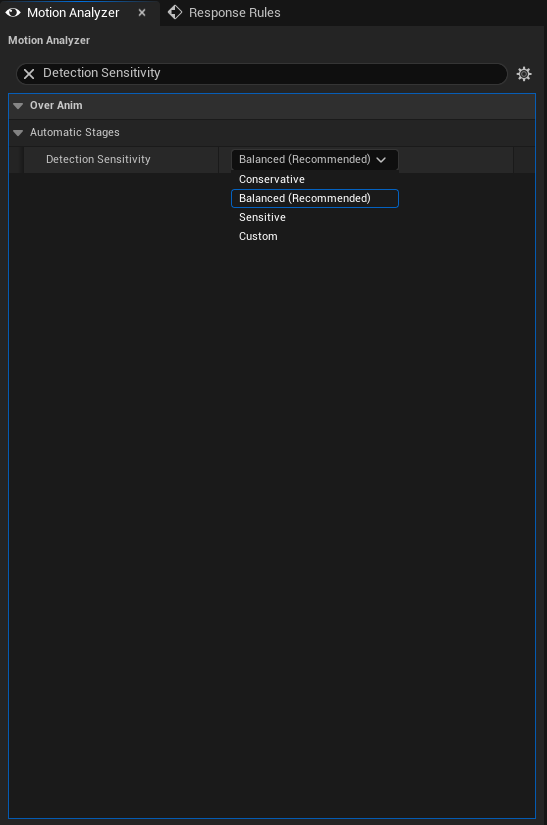
Sensitivity
Conservative, Balanced, Sensitive, Custom을 사용해 감도를 정할 수 있습니다.
- 처음에는
Balanced에서 Preview합니다. - 짧은 고속 동작을 놓치면
Sensitive를 시도합니다. - 흔들림이나 노이즈에 반응하면
Conservative로 낮춥니다. - 프로젝트의 입력 모션 특성이 분명할 때만
Custom임계값을 사용합니다.
Grounding과 액션 경계
CharacterMovement가 있으면 Grounded 판정에 우선 사용됩니다. 없으면 ground probe와 수직 속도를 함께 사용합니다. Montage 시작/끝과 Section 전환은 새 액션의 경계로 활용할 수 있습니다.
Analyze Automatic Stages는 analyzer의 활성 범위를 정합니다.
| 값 | 동작 |
|---|---|
Continuous Animation Motion |
모든 final animation pose를 분석합니다. locomotion과 상시 secondary motion에 적합합니다. |
Only During Montage or Explicit Action |
Montage action boundary 또는 Start New Automatic Motion Action으로 연 명시적 window 안에서만 분석합니다. 공격 전용 에셋에 적합합니다. |
Automatic (Legacy Compatibility) |
이전 asset의 Montage boundary 연동 동작을 보존하기 위한 호환 값입니다. 새 asset에서는 위 두 값을 명시적으로 선택합니다. |
Use Montage Action Boundaries가 켜지면 Montage 시작이 새 cycle을 엽니다. 중단된 Montage는 blend-out에서 즉시 닫히지만 정상 blend-out은 Montage 종료까지 분석되어 Recoil과 Settle motion을 보존합니다. Treat Montage Parts as Separate Actions는 Section뿐 아니라 Montage 안의 embedded Animation Sequence가 바뀔 때도 새 action을 엽니다.
Rebase On Anim State Transitions의 기본값은 켜짐입니다. Anim Blueprint state crossfade 동안 pose derivative를 자동으로 재기준화하므로, 일반 State Machine 전환마다 Start New Automatic Motion Action을 호출할 필요가 없습니다. 이 Blueprint/C++ 함수는 게임플레이가 명시적으로 새 action boundary를 열어야 할 때 사용합니다. 현재 action을 닫고 재무장하려면 Cancel Automatic Motion Action을 사용합니다.
Starting Pose Return Tolerance는 root-relative Region motion이 시작 pose 부근으로 돌아와야 cycle을 닫도록 제한합니다. 1은 위치 복귀 guard를 사실상 끕니다.
Region routing과 authored timing
각 Bone Group의 Action Group, Analyze Animations, Allowed Animations, Analysis Method가 어느 Region이 automatic stage를 받을지 결정합니다. 자세한 저작 규칙은 Bone Group과 Region을 참조합니다.
연속 Stage Curve 또는 OverAnim Motion Stage Marker를 사용하면 authored timing이 automatic 분석보다 우선합니다. 최종 우선순위는 Authored Stage Curve > Motion Stage Marker > automatic analysis입니다.
Response와 연결하기
Motion Analyzer 값을 바꾼다고 기존 Rule이 자동으로 모션 Signal을 향하도록 변경되지는 않습니다. Response Rules에서 원하는 Signal과 Motion Only 또는 Automatic Six-Stage Motion 설정을 명시해야 합니다.
자동 6단계 모션은 bEnableMotionSignals, bEnableRegionMotionSignals, bEnableRegionMotionPhaseSignal이 모두 활성화되어야 의미가 있습니다. 이 설정의 공개 타입은 Motion · Simulation Types에서 확인할 수 있습니다.